Shops and small chains
The shelf says one thing, the online shop another, and you oversell.
One available figure for every channelInventory management for shops, stockrooms and distributors
Three numbers for each item, kept apart and kept current, with the movements behind them. Then let those numbers tell you what to order next.
Example data
The other RDCopilot products read and write the same items and quantities.
Localisation modules for companies operating in Romania: e‑Factura · e‑Transport
Different businesses, the same questions: what do we have, what is promised, what do we order?
Your stockroom, your shop floor and your showroom each keep their own quantities. You still see one total, and you can always tell which location a unit is in.
| Item | SKU | On hand | Reserved | Available | Incoming | Status |
|---|---|---|---|---|---|---|
| Shipping box 40×30×20 | BX-040 | 128 | 24 | 104 | 0 | Below reorder point |
| Packing tape 48 mm | TP-048 | 72 | 18 | 54 | 48 | Above reorder point |
| Work gloves, size M | GL-009 | 46 | 16 | 30 | 0 | Below reorder point |
Shipping box 40×30×20 BX-040
Below reorder point
Packing tape 48 mm TP-048
Above reorder point
Work gloves, size M GL-009
Below reorder point
| Item | SKU | On hand | Reserved | Available | Incoming | Status |
|---|---|---|---|---|---|---|
| Shipping box 40×30×20 | BX-040 | 36 | 6 | 30 | 0 | — |
| Packing tape 48 mm | TP-048 | 20 | 4 | 16 | 0 | — |
| Work gloves, size M | GL-009 | 10 | 2 | 8 | 0 | — |
Shipping box 40×30×20 BX-040
Packing tape 48 mm TP-048
Work gloves, size M GL-009
| Item | SKU | On hand | Reserved | Available | Incoming | Status |
|---|---|---|---|---|---|---|
| Shipping box 40×30×20 | BX-040 | 12 | 0 | 12 | 0 | — |
| Packing tape 48 mm | TP-048 | 6 | 0 | 6 | 0 | — |
| Work gloves, size M | GL-009 | Not stocked here | ||||
Shipping box 40×30×20 BX-040
Packing tape 48 mm TP-048
Work gloves, size M GL-009
Not stocked here
| Item | SKU | On hand | Reserved | Available | Incoming | Status |
|---|---|---|---|---|---|---|
| Shipping box 40×30×20 | BX-040 | 176 | 30 | 146 | 0 | — |
| Packing tape 48 mm | TP-048 | 98 | 22 | 76 | 48 | — |
| Work gloves, size M | GL-009 | 56 | 18 | 38 | 0 | — |
Shipping box 40×30×20 BX-040
Packing tape 48 mm TP-048
Work gloves, size M GL-009
Each card is one part of daily stock work. We switch on the ones your operation uses.
Record what arrived against what was ordered, note differences, and put stock on the shelf in one step.
Move stock between locations with a transfer document. Both sides are recorded together.
Returns can go to a separate review location first, then move back to sellable stock with a transfer.
Count by location, review the differences and post them as a movement, with who counted and when.
Every item has its own code, the same in every location and channel. Shelf labels and handheld scanners come with RDCopilot Warehouse.
Every receipt, reservation and transfer for an item, in order.
An order or a basket reserves units once. Every channel sees the same available quantity.
Quantities by item and location, and the full movement ledger for your accountant.
Example data
Goods are checked against the order and enter stock.
Documents: Purchase order · Receipt
Each unit has a location: stockroom, shop or showroom.
Documents: Stock list · Location
An order or a POS basket reserves units once.
Documents: Sales order · Online order · POS basket
Stock leaves with the sale or the transfer.
Documents: Sale · Transfer
Returns go to review first; reorder points show what to buy.
Documents: Return · Reorder point · Purchase order
ReservationsA sale reserves stock once, from the location you set.
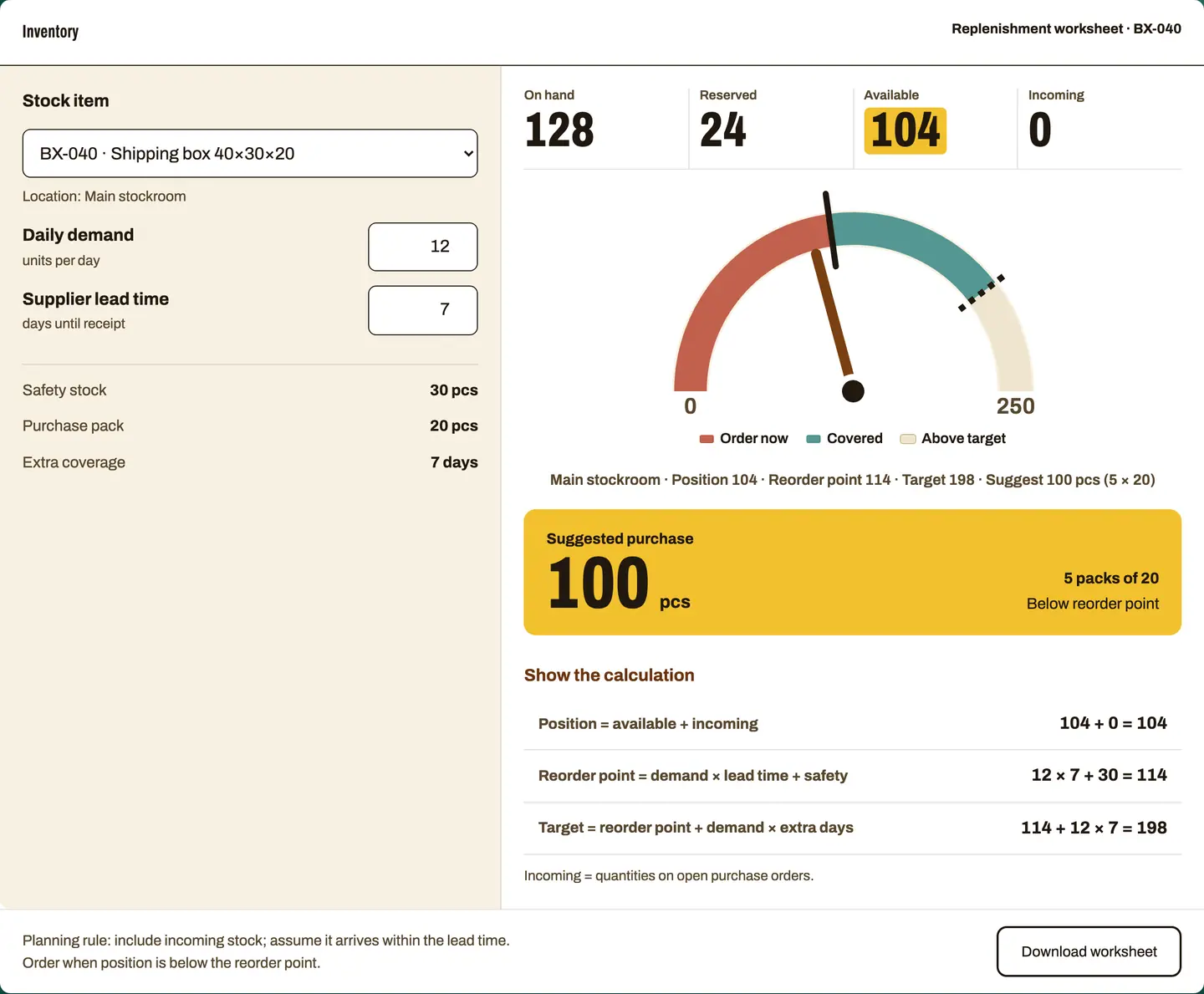
Pick an item, adjust demand and lead time, and watch the purchase suggestion change. At setup we use this rule to set each item’s reorder point and order quantity per location.
Keep committed units out of your promise.
Demand during lead time, plus a safety buffer.
Round the shortfall up to a quantity you can buy.
Main stockroom · Position 104 · Reorder point 114 · Target 198 · Suggest 100 pcs (5 × 20)
| Position = available + incoming | 104 + 0 = 104 |
|---|---|
| Reorder point = demand × lead time + safety | 12 × 7 + 30 = 114 |
| Target = reorder point + demand × extra days | 114 + 12 × 7 = 198 |
Incoming = quantities on open purchase orders.
Planning rule: include incoming stock; assume it arrives within the lead time. Order when position is below the reorder point.
Trace today’s number back through each movement. Each line records the document, who posted it and when. Nothing is edited after the fact; a correction is a new line that reverses the old one.
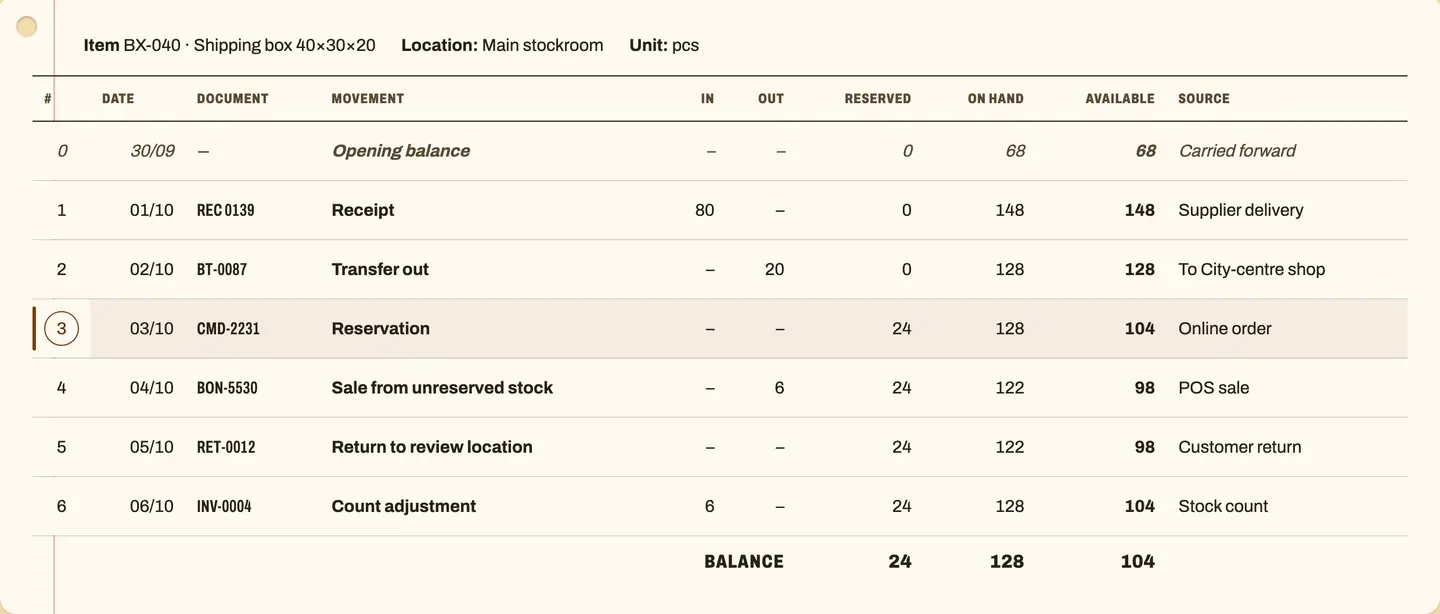
What is physically on the shelf. Only receipts, transfers, sales, returns and counts change it, each on its own line of the card.
What orders have already claimed. A reservation changes only what you can still sell; the shelf stays the same.
On hand minus reserved, on every line: the number you can promise to the next customer.
REC 013901/10
Receipt against purchase order
| Check | pcs |
|---|---|
| Ordered | 80 |
| Delivered | 80 |
| Damaged or missing | 0 |
| Put into stock | +80 |
Checked · posted to line 1
Example data. In the product, the stock card is filtered by item, location and period, and exports for your accountant.
Receiving notes and the stock card are printed in the format you agree with your accountant.
Most teams start from a spreadsheet. Inventory takes over the stock record, and connects to RDCopilot ERP when you want finance, purchasing and sales in the same system.
| Criterion | Spreadsheet | RDCopilot Inventory |
|---|---|---|
| Available = on hand − reserved, kept current | No, manual | Yes |
| Movement history with documents | No | Yes |
| Reorder points worked out in the open | No | Yes, worksheet at setup |
| What setup involves | import a list | items, locations and a first count |
| Scope | stock list | stock, reservations, reorder |
| Connects to RDCopilot ERP, POS and warehouse | No, copy by hand | Yes |
Items, units, locations and who can work in each. We agree opening stock.
Your item list and opening quantities come in from Excel or your current program. We check codes, units and duplicates first.
We scope the ERP, POS, warehouse and e-invoicing handoffs against one shared stock record.
A first count, a short training for the people who work with stock, and support in English and Romanian afterwards.
One-off setup — configuration, data import, connections and training.
Monthly licence — hosting in the EU, backups, updates and support.
Prices are quoted once we know how your stock moves.
Yes. Each stockroom, shop or showroom is its own location with its own quantities. Transfers move stock between them, and you see the total across all of them.
On hand is what is physically there. Reserved is what orders or baskets have already claimed. Available is on hand minus reserved: what you can still promise. You cannot reserve or sell more than is available; the record never goes negative.
Reorder point = daily demand × supplier lead time + safety stock. When your position (available plus incoming) falls below it, the suggestion is enough to reach your target, rounded up to the purchase pack. The worksheet above shows the rule. We use the worksheet with you at setup to set reorder points per item and location.
Yes. We import your item list, units and opening stock, and check codes and duplicates first. A first stock count at go-live confirms the starting point, and your yearly stocktake runs on the same record. Receiving notes and the stock card are printed in the format you agree with your accountant.
Every item in Inventory has its own code, the same in every location and channel. Shelf labels with barcodes are printed from RDCopilot Warehouse. Counting with handheld scanners on the floor is part of RDCopilot Warehouse.
Inventory keeps the stock record. Invoicing (in RDCopilot ERP or POS), e‑Factura and e‑Transport are separate RDCopilot products that connect to it, so documents and stock refer to the same items and quantities. e‑Transport declares the loads that need a UIT code.
In data centres in the European Union. Support comes from the RDCopilot team in English and Romanian. Your data stays yours, and balances and the full movement history can be exported.
The SAF-T (D406) stock section is filed only when ANAF requests it, with at least 30 days to respond. Inventory keeps the stock record it draws on, and RDCopilot Declarations prepares the file from the same items and quantities.
A one-off setup fee and then a monthly licence. The quote depends on locations, items, connections and data migration. Tell us how your stock moves and we will send it.
Tell us how your stock moves: locations, items, channels. We will come back with a setup plan and a quote.
Inventory is one module of the operating system for your company: finance, operations, growth, AI and compliance on one platform, each with its own site.
All productsCheck units, stock movements, reservations and supplier commitments before automating replenishment, then give buyers purchasing suggestions they can explain.
Connect return arrival, inspection and approved stock release so the warehouse and customer service can trace each item's condition, destination and next action.
Design stock reservations across sales channels with one authority for accepting commitments, clear expiry rules and recovery for uncertain or repeated requests.
© 2026 R&D COPILOT Made in EU Contact form